Tinker Shopify Themsse Review: Modern Structure With A Calm, Confident Look

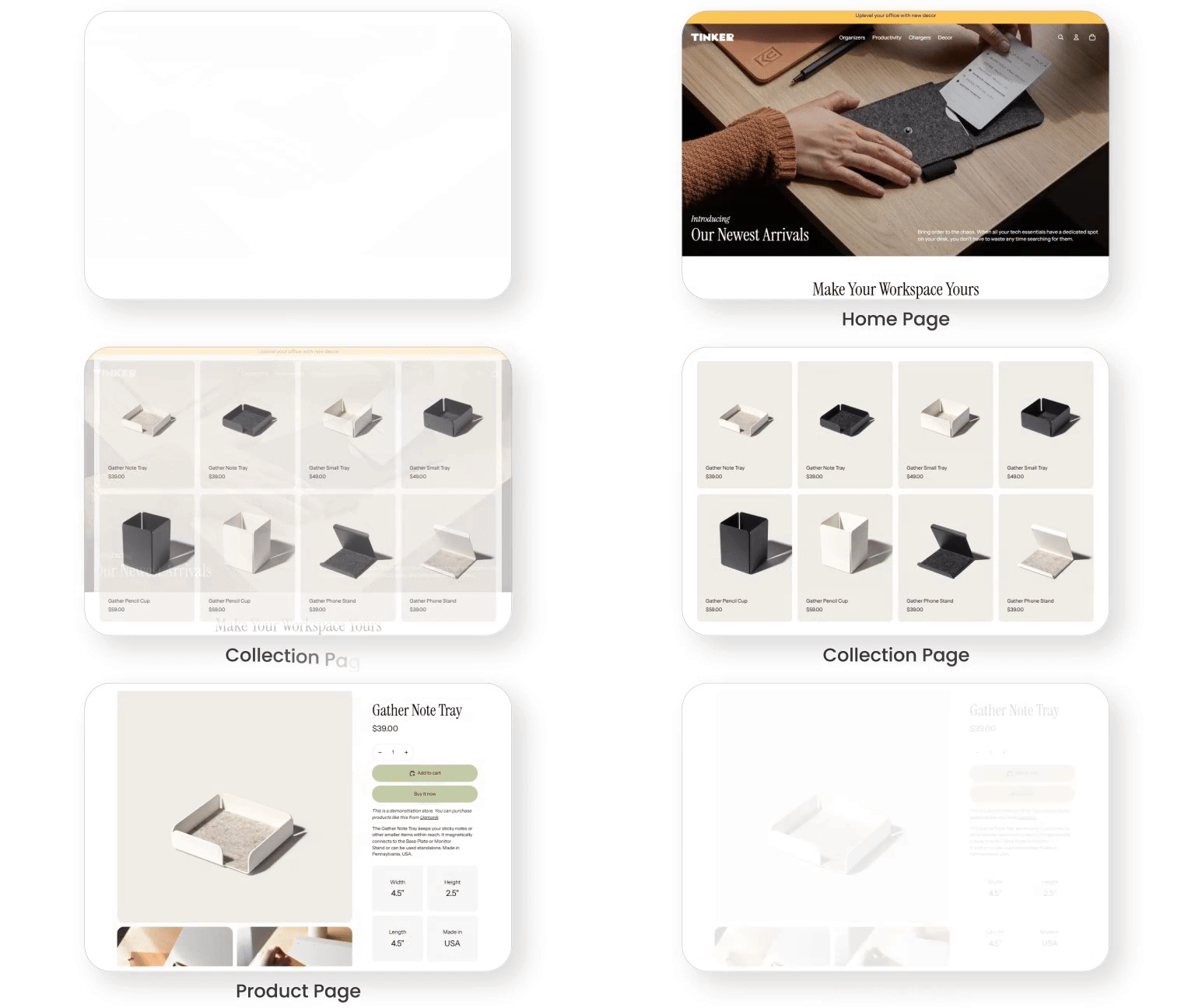
Tinker Shopify Theme is a FREE Horizon-style option built for clean grids, media-led sections, and fast storefront assembly. Team eComOpus tested it across catalog browsing, product-detail flows, and mobile usability to see where it excels and where it needs restraint.
- Crisp grid layout for modern catalogs
- Visual sections built for storytelling
- Quick-buy flow for faster cart building
- Templates for different product types
- Stable layout that reduces mis-taps
- FREE base that scales with growth
Introduction
Team eComOpus set up a test store on Shopify using Tinker and ran it through real scenarios: long collections, variant-heavy products, mixed media, and common apps. The layout makes browsing feel effortless. A merchant comment that captures the mood is simple and telling: “The free themes are actually pretty solid now.”
From a shopper’s perspective, the theme leans into clarity first, then brand personality. Navigation stays tidy, product cards look intentionally spaced, and the page rhythm avoids the “plugin collage” feeling some Shopify stores slip into. It feels reliable and thoughtfully built. If your goal is modern, organized shopping, this theme fits naturally for a Shopify store.
Ideal For Niches With Supporting Features
Tinker is flexible, but its strengths show up faster in certain niches. Team eComOpus mapped where the grid, content blocks, and product layouts match how people browse and compare. The table below highlights those best-fit categories in practical terms.
| Niches | Supporting Features | Why They Matter? |
|---|---|---|
| Electronics and gadgets | Spec-friendly layouts, clean typography, structured collections | Shoppers compare quickly, so strong hierarchy reduces hesitation. A tidy grid keeps technical catalogs readable at a glance. |
| Home decor and organization | Large imagery sections, editorial spacing, modular homepage flow | Visual categories need breathing room to feel premium. Modular blocks help sell sets and collections without clutter. |
| Stationery and gifts | Quick buy behavior, clear collections, flexible promo slots | Gift buyers add multiple items, so quick actions preserve momentum. Promo slots keep gifting language visible without hiding products. |
| Beauty and wellness | Media-first storytelling, focused product info areas, consistent styling | Buyers look for reassurance, so clean detail grouping builds trust. Consistent styling keeps the brand feeling polished across pages. |
| Small-batch makers | Templates for different products, narrative sections, adaptable sequencing | Makers need story plus product, and templates keep both organized. Sequencing supports launches and limited drops without redesigning everything. |
Presets
Tinker is a standalone FREE theme with no presets, which keeps the starting point simple. Instead of switching skins, you shape the look with sections, templates, and theme settings. This approach suits merchants who prefer structure-first building and controlled iteration.
Key Features And Highlights
Features matter only when they change how people shop. Team eComOpus focused on discovery speed, product-page confidence, and fewer steps to purchase. The table below explains the most useful features we saw during testing and why they matter in practice. If you are comparing Shopify themes, Tinker Shopify Theme stands out when you value structure over gimmicks.
| Features | What It Is And Why It Matters? |
|---|---|
| Sticky add to cart option | A fixed purchase action keeps intent alive while shoppers scroll details. It reduces backtracking on mobile and supports stronger add-to-cart momentum on long pages. |
| Modular section system | Sections can be rearranged and reused, keeping campaigns consistent without code. It speeds iteration and helps avoid layout drift as your store expands. |
| Collection grid control | Product cards hold structure when titles, prices, and imagery vary. Consistency reduces visual noise and makes comparison feel easy during fast scrolling. |
| Quick buy on listings | Shoppers can add items from collections without opening every product page. This supports multi-item carts and repeat buyers who already know what they want. |
| Visual storytelling blocks | Media-first blocks set mood, then return attention to products quickly. With good photography, the store feels premium without stacking extra design apps. |
| Template-based customization | Different products or collections can use different templates without chaos. It keeps complex items readable while letting simple items stay clean and quick to buy. |
| Clear navigation patterns | Menus and category paths stay tidy, reducing “where am I?” friction. This matters most on mobile, where attention drops fast when navigation feels unclear. |
| Content grouping for flow | You can sequence proof, product, and promotion in a deliberate order. A guided flow converts better than a random stack of sections and blocks. |
| Brand-friendly spacing and type | Default spacing creates calm scanning and reduces perceived effort. It’s easy to create a premium feel without extra work when your content is strong. |
| AI-assisted section creation | Built-in AI can generate new section ideas inside the editor with good prompts. It accelerates experimentation, but it still needs a clear plan and cleanup. |
Theme Experience!
Looks are only half the story, because shopping is a sequence of small moments. Team eComOpus reviewed Tinker through first impression, browsing flow, and product-page decisions across devices. The table below summarizes what shoppers tend to feel in practice and why it matters.
| Experience Area | What Shoppers Feel In Practice? |
|---|---|
| First impression | The storefront feels modern and ordered, with spacing that makes products look intentional. Shoppers often read that calm layout as higher quality and trust. |
| Collection browsing | Grids stay readable as shoppers scroll, so the catalog feels easy to explore. Structure helps keep attention when many items look similar. |
| Product detail depth | Information can be layered cleanly for comparison without clutter. Shoppers feel guided when details are grouped logically and kept scannable. |
| Mobile navigation | Tap targets and menus feel practical, so moving between categories is straightforward. A clean mobile flow matters because discovery often starts on phones. |
| Visual storytelling | Media sections add mood without burying the catalog during browsing. Shoppers get context quickly and still return to products without losing orientation. |
| Add-to-cart momentum | Quick actions reduce steps between interest and cart. Sticky purchasing helps maintain intent when pages are long and information-heavy. |
| Filtering and discovery | With sensible setup, narrowing choices feels direct and responsive. Heavy filter apps should be tested carefully to avoid subtle interaction delays. |
Performance, Explained!
Tinker’s field performance is notably stronger on desktop than mobile, and that difference is worth planning around. Mobile Core Web Vitals can fail mainly because LCP and INP trend into “needs improvement” ranges, while CLS stays excellent. Desktop behavior is steadier, which benefits brands with research-heavy shoppers.
| Performance Parameters | Mobile | Desktop | Remarks |
|---|---|---|---|
| Performance Score | 75/100 | 94/100 | Mobile speed is serviceable but improves most with smaller media and fewer scripts. Desktop speed is strong, so merchandising feels snappy even with rich sections. |
| First Contentful Paint | 2.4 s | 1.9 s | Mobile shows content later than ideal, so above-the-fold choices should stay lean. Desktop renders early enough that the store feels responsive immediately. |
| Largest Contentful Paint | 3.5 s | 2.7 s | Mobile LCP points to hero media as the bottleneck, so compression and simpler top layouts help. Desktop LCP is comfortable when the hero is not overloaded. |
| Cumulative Layout Shift (CLS) | 0.00 | 0.01 | Layout stability is excellent, reducing mis-taps and frustration on mobile. It also makes the storefront feel “solid” while loading. |
| Time to Interactive (TTI) | Not reported in field data | Not reported in field data | PageSpeed field reporting centers on real-user Web Vitals, not lab-only interaction timing. Treat app load and heavy media as your practical TTI levers. |
| Speed Index | Not reported in field data | Not reported in field data | Speed Index is a lab metric and isn’t included in this field snapshot. Optimize images and limit third-party assets to improve perceived progress. |
Merchant feedback matches the pattern: stores that migrate with large images, many videos, or too many add-ons often describe the theme as “slow,” even when layout stability remains strong. Tinker Shopify Theme is stable enough that optimizations tend to pay off, especially on mobile. For many Shopify stores, the biggest wins come from media discipline and app restraint. Focus on compressed media, a lean homepage, and a trimmed app stack to keep store performance feeling crisp. That combination usually lifts mobile feel more than chasing tiny code tweaks.
Pricing
Tinker is priced at $0, so you can validate fit without a license fee. New merchants get a faster launch and more budget for photography, copy, and marketing, while established stores can modernize on Shopify without paying for a redesign package. The trade-off is that missing “premium extras” often come from apps, and apps can add recurring costs plus performance weight. If you want the best return from this FREE theme, keep the app stack tight, compress images before uploading, and limit autoplay video. Used with that discipline, the storefront can look current and convert well, even without paid add-ons.
Stores Build with Tinker Shopify Theme
Live examples help validate how a theme behaves after real editing choices. Team eComOpus curated the list below from merchants who shared positive experiences with the look and workflow. These stores show how different brands can keep the same base design feeling clean and intentional.
- Lamb’s Light
- Tendre papier
- Hyatt Fruit Company
- Silver Triangle Leatherworks
- Red Branded
- Musicmedia24
Themes Similar to Tinker
Comparisons reveal whether you need a different vibe or deeper built-in tools. Team eComOpus selected alternatives based on modern structure, flexible sections, and merchandising flow. The table mixes free and paid themes so you can see what changes when you spend.
| Shopify Theme | FREE or Paid? | Why is it Similar? |
|---|---|---|
| Horizon | FREE | It shares a modern system feel and prioritizes flexible sections over rigid preset styling. Both suit merchants who want a clean framework and refine it with content. |
| Dwell | FREE | It leans on calm structure and storytelling, keeping browsing orderly and readable. Like Tinker, it rewards organized catalogs and strong imagery. |
| Fabric | FREE | It is minimalist and image-forward, so photography carries the experience. Similarity shows up in how both benefit from restrained layouts and clean media. |
| Dawn | FREE | It is a broad foundation theme with a familiar editing rhythm for many Shopify merchants. It is often compared when choosing between classic flexibility and the newer Horizon approach. |
| Impact | Paid | It delivers a modern, conversion-first feel with deeper merchandising tools built in. The overlap is fast browsing and clean visuals, while paid depth reduces app reliance. |
Pros and Cons
Pros and cons should reflect what merchants actually notice after launch. Team eComOpus distilled the most consistent feedback themes and cross-checked them against hands-on testing. The table below highlights strengths you will feel quickly and considerations that deserve a plan.
| Pros | Cons |
|---|---|
| Product pages feel modern and composed. Sticky purchasing keeps intent close during long scrolls. | Variant-heavy catalogs may want clearer “from” pricing cues. Simple copy or badge adjustments can reduce confusion. |
| Sections create strong page rhythm. You can guide attention without piling on design apps. | Mobile controls can feel less obvious than desktop controls. A setup checklist keeps sizing and spacing consistent. |
| Collection grids stay readable at scale. Browsing feels calm, supporting longer sessions and easier comparison. | Deep customization can require extra review after updates. Keeping notes makes maintenance far less stressful. |
| Visual storytelling looks premium with good photos. Spacing keeps pages breathable and brand-forward. | |
| Editing becomes fast once learned. The workflow stays repeatable as the catalog grows. |
Our Rating
Ratings should translate real use into a quick decision, not act like a scoreboard. Team eComOpus scores themes using hands-on setup, repeated merchant patterns, and the effort needed to reach a polished storefront. The table below explains each score so you can understand the trade-offs fast.
| Parameters | Our Ratings | Summary |
|---|---|---|
| Feature Depth | 4.2/5.0 | Core selling essentials are strong and cover modern storefront needs out of the box. Advanced merchandising extras still need apps, but the base set feels complete. |
| Design and Customization | 4.5/5.0 | The design system stays consistent, so tweaks still look intentional and clean. Sections and templates add real flexibility when you plan structure before styling. |
| Performance | 4.0/5.0 | Desktop browsing feels crisp and supports research-heavy shopping without friction. Mobile performance is workable, but improves most with optimized media and fewer scripts. |
| Value for Money | 5.0/5.0 | At $0, the value is excellent for merchants with limited budget. Savings can be redirected into photography and conversion testing that pays back faster. |
| Support and Updates | 4.1/5.0 | Merchant replies show active guidance and clear pointers to settings and fixes. Updates can shift heavily customized stores, so a change checklist is wise. |
| Overall | 4.4/5.0 | It delivers a modern storefront with flexibility that fits many niches. With sensible setup habits, it can feel close to paid quality for everyday stores. |
User Reviews: What Merchants Say
Merchant feedback often frames Tinker as unusually capable for a free theme, especially when merchants keep the store tidy and use the editor intentionally. Many reviewers praise the out-of-box look and how quickly the storefront can feel modern without a paid license.
The recurring requests are specific, not existential: clearer add-to-cart visibility on collection pages, more predictable mobile controls, and a smoother update experience for deeply customized stores. Some reviewers mention slowness, but it commonly ties to heavy media or large app stacks rather than constant layout instability.
One line that captures the positive sentiment appears in multiple forms across reviews: “Great theme, really enjoyable to work with!” That enthusiasm is strongest when merchants optimize images early and avoid bloating the storefront with unnecessary scripts.
Our Verdict
Tinker Shopify Theme is a strong pick for merchants who want a modern storefront without paying a license fee. It works best when you lead with structure, then layer in brand personality through imagery, section order, and concise copy.
Desktop performance is a clear advantage, and the stable layout helps the store feel trustworthy during browsing. Mobile results improve when you keep above-the-fold light and avoid stacking too many apps.
If your brand values clarity and visual polish over flashy gimmicks, Tinker Shopify Theme can deliver a paid-like feel with disciplined setup on Shopify.
Who Should Not Buy Tinker
Stores that depend on built-in advanced merchandising features, like complex discount visuals or niche product-card behaviors, may feel constrained and should consider a paid theme. If your model requires many specialized app integrations, expect more effort to keep interaction smooth and performance clean.
Brands that want extreme design experimentation without structure may also feel boxed in, because the default personality is “clean and organized.” For those stores, a more expressive theme can reduce the customization needed to match the brand’s tone.
GET THE BEST APPS IN YOUR INBOX
Don't worry we don't spam