Savor Shopify Theme Review: Editorial Layouts For Story-First Online Stores
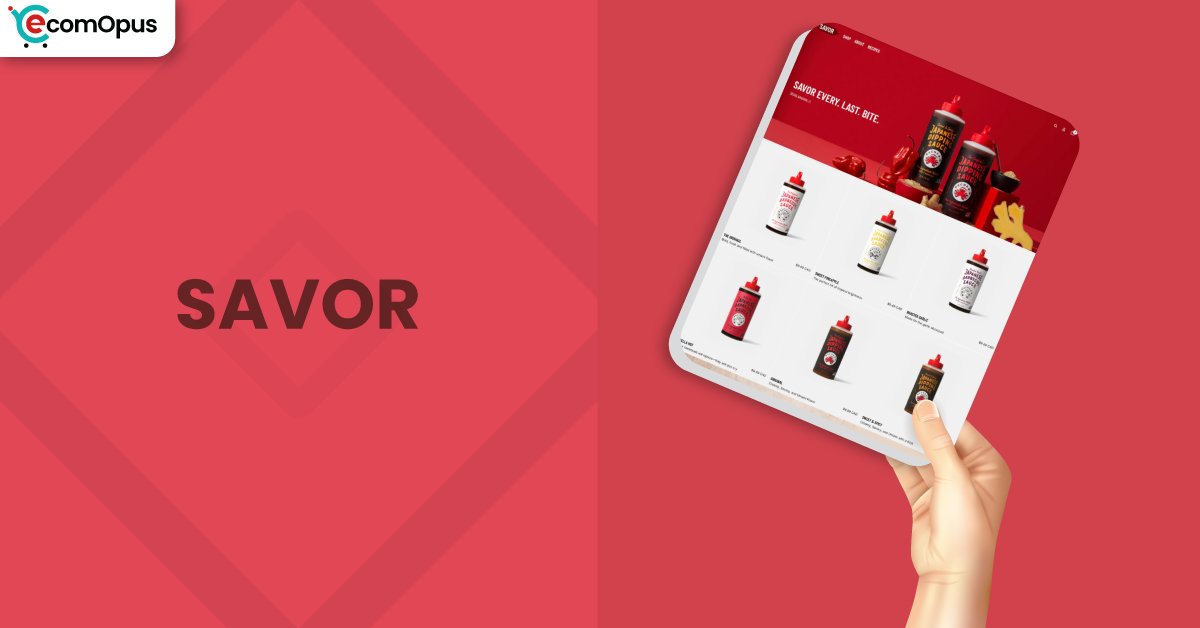
Savor is a FREE Shopify theme that pairs bold visuals with editorial pacing for curated catalogs. It fits brands that sell with atmosphere and clean, repeatable templates.
- FREE theme built for brand storytelling, large media, and confident typography
- Great for curated catalogs where photography and layout rhythm do the selling
- Best results come from templates, metafields, and a tidy app stack
- Mobile experience needs careful QA because interaction issues appear in some reviews
- Performance can be strong on desktop, but mobile is more sensitive to heavy hero media

Introduction
Savor Shopify Theme is designed like a tasting menu: it gives you structure, pacing, and presentation, then asks you to supply the ingredients. We noticed right away that the layout encourages shoppers to slow down, browse intentionally, and absorb the brand tone before they compare prices. “Everything feels thoughtfully designed and well balanced.” That sense of control is a real advantage for stores that want to feel premium without feeling busy.
This theme also has a “learn the system” side to it, which shows up repeatedly in merchant feedback. One merchant put it plainly: “For a Free Theme – it’s pretty robust, especially if you know how to tweak it a bit more than out of the box.” In other words, Savor isn’t a one-click makeover, but it can become a standout storefront once you commit to the editor. We focus on on how it behaves in real builds, what merchants struggle with, and what you can do to avoid common pitfalls.
Ideal For Niches With Supporting Features
Savor tends to work best where brand mood matters and the product story benefits from space. If your catalog sells by utility alone, a simpler theme may be faster to set up and easier to maintain. If your catalog sells by texture, aesthetic, and identity, Savor’s editorial framing can add perceived value. The niches below show where we see the strongest fit, based on the theme’s patterns and the review signals.
| Niches | Supporting Features | Why They Matter? |
|---|---|---|
| Fashion and Apparel | Bold imagery, strong type hierarchy, multi image product presentation | Apparel buyers scan visuals first, and Savor’s layout helps products feel like a collection rather than a grid. |
| Beauty and Personal Care | Structured content blocks, clean product storytelling, consistent spacing | Beauty stores often need benefits, ingredients, and usage guidance without cluttering the page or overwhelming shoppers. |
| Lifestyle and Home Goods | Editorial sections, large banners, curated collection framing | Home and lifestyle products benefit from staging and mood, and the theme gives photography room to persuade. |
| Specialty Consumables | Collapsible details, template repeatability, clean navigation patterns | Consumables often require ingredient and sourcing details, and collapsibles keep information accessible without endless scrolling. |
| Premium Accessories | Focused product emphasis, visual rhythm, high perceived value design | Accessories sell better when the storefront feels intentional, and Savor’s spacing helps elevate presentation. |
Presets
Savor ships as a single Shopify theme experience, so there are no alternate presets to switch between. Your “preset” comes from sections, typography, and color choices. Because it’s FREE, you can iterate in draft until the store feels cohesive.
Key Features And Highlights
Savor’s best features are about consistency: build a look once, then repeat it across the catalog. It avoids gimmicks and instead leans on sections, templates, and structured content blocks.
We focused on features that influence real operations, such as product storytelling, navigation stability, and language readiness. The table below highlights what matters most and includes setup notes so each feature behaves predictably.
| Features | What It Is And Why It Matters? |
|---|---|
| Hero media with mobile aware control | Merchants highlight that hero presentation can be tuned so mobile crops feel less punishing than a desktop-first banner. This helps keep first impressions consistent when most traffic arrives from phones. |
| Product media navigation options | Product media can be configured for carousel-style browsing and more structured pagination behavior, depending on how you set the media block. This matters for multi angle items because shoppers want quick visual confirmation before buying. |
| Collapsible rows for deep product details | You can place ingredients, care instructions, or FAQs into collapsible rows so the page stays clean while still being informative. It also helps reduce scrolling fatigue on smaller screens. |
| Template driven layout control | Templates let you create different page structures for different product types instead of forcing everything into one layout. This reduces repetitive manual edits when you add new products or launch new collections. |
| Metafield powered content patterns | Metafields can feed dynamic content into sections so product pages stay consistent while still being personalized per item. It is especially useful when your catalog has structured specs or repeated story blocks. |
| Navigation styling with editorial tone | The header and menu styling are designed to feel integrated with the theme’s bold design language rather than pasted on. Keeping menus concise generally leads to fewer mobile navigation surprises reported by merchants. |
| Blog and content building blocks | Savor supports content-forward layouts, which matters for brands that rely on education and storytelling alongside products. Merchants recommend testing content blocks after changes, since updates can affect how images render. |
| Localization and translation considerations | Some reviews mention certain interface strings not translating cleanly in specific languages, which can impact shopper confidence. A thorough theme language review and translation setup can prevent awkward mixed-language moments. |
| Cart behavior and interaction patterns | Reviews show that cart interactions can feel smooth in clean installs, but may break when scripts conflict or settings change. A lean app stack and careful mobile QA usually reduces these issues significantly. |
| Developer friendly extensibility | Developers note that the theme can be extended with custom code when you need unique merchandising touches beyond the editor. The trade-off is that updates require deliberate re-testing to avoid regressions. |
Theme Experience!
Theme experience is where Savor either wins hearts or tests patience, depending on how the store is built. The design encourages a slower, more considered shopping flow that can increase perceived value for the right products. At the same time, merchants report that navigation and cart behavior must be validated on mobile, not assumed. Our team evaluated Savor across the typical shopper journey, focusing on how it feels rather than only what it offers.
| Experience Area | What Shoppers Feel In Practice? |
|---|---|
| First Impression | The homepage feels editorial and deliberate, especially when hero media is high quality and typography is consistent. If images are mismatched, the same bold layout can magnify inconsistency quickly. |
| Collection Browsing | Collections can feel curated because spacing and hierarchy reduce the “warehouse” vibe common in generic grids. Large catalogs may require extra filtering strategy so shoppers don’t feel lost. |
| Product Page Clarity | Product pages emphasize visuals first, then details, which suits items that need photography to persuade. Clear variant configuration matters, or shoppers may see confusing unavailable options. |
| Mobile Navigation | The navigation can feel sleek, but long menus and deep nesting increase the chance of awkward collapses on touch devices. Testing with real thumb behavior is essential before launch. |
| Cart and checkout momentum | When cart actions work smoothly, the buying flow feels fast and uncluttered, which supports conversion. Some merchants report mobile cart glitches, so you should test add, remove, and quantity changes repeatedly. |
| Content and blogging flow | Brands that publish can build richer journeys with content sections that support education and storytelling. Merchants mention blog image quirks after changes, so staging tests are recommended. |
| Global shoppers and language polish | International stores may notice untranslated microcopy if translation settings and theme text are not reviewed carefully. A language audit improves clarity and reduces shopper hesitation. |
Performance, Explained!
Performance is the area where the provided data and the merchant reviews intersect in an interesting way. The screenshots show a strong desktop score but a weaker mobile score, and both are flagged as failing the Core Web Vitals assessment. That usually happens when the largest visible element loads too slowly, even when the page is stable and not “jumpy.” We treat this as a reminder that Savor rewards disciplined builds, especially on mobile connections.
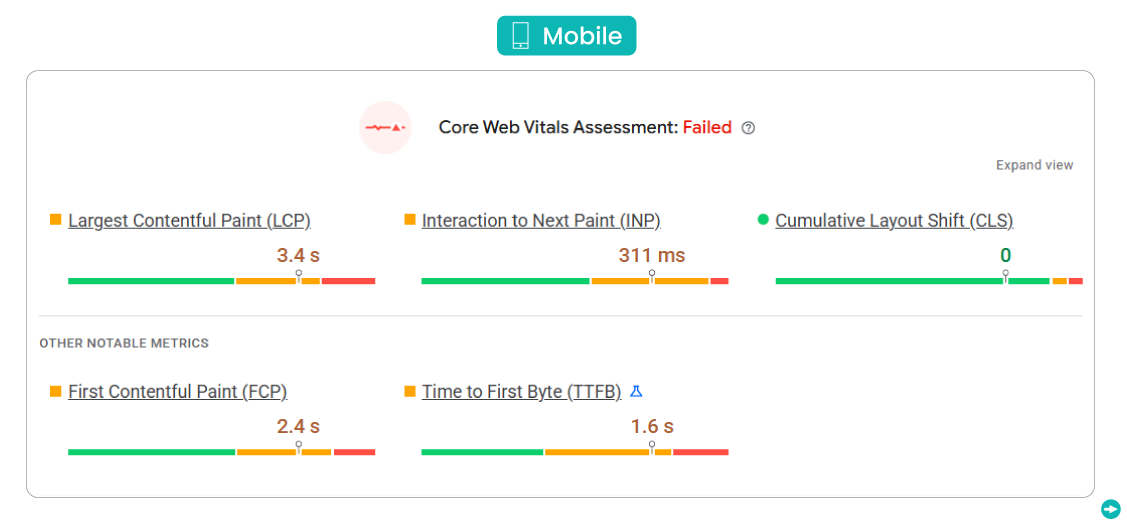
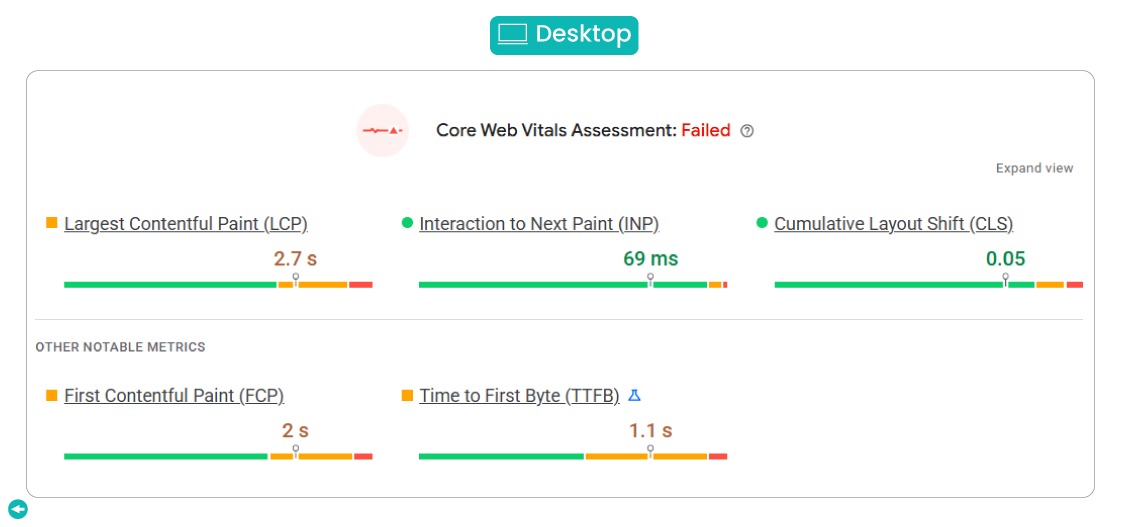
The table below summarizes the key metrics and what they mean for a store owner. We included the standard speed parameters plus interaction and server timing, because those two categories often explain why some merchants report “lag” while others report smooth browsing. Keep in mind that your results will vary based on media weight, fonts, and app scripts. The goal is not perfection on day one, but predictable improvement with each optimization pass.
| Performance Parameters | Mobile | Desktop | Remarks |
|---|---|---|---|
| Performance Score | 72/100 | 95/100 | Desktop looks strong, while mobile shows clear sensitivity to page weight and third-party scripts. |
| First Contentful Paint (FCP) | 2.4s | 2.0s | The first visible content arrives moderately fast, but heavy hero assets can still make the page feel slow. |
| Largest Contentful Paint (LCP) | 3.4s | 2.7s | LCP is the main reason for the failed assessment, so optimizing the largest hero element is the priority. |
| Cumulative Layout Shift (CLS) | 0 | 0.05 | Layout stability is excellent, which protects trust because buttons and content do not move during load. |
| Interaction to Next Paint (INP) | 311ms | 69ms | Desktop responsiveness is very strong, while mobile is closer to the threshold where taps can feel delayed. |
| Time to First Byte (TTFB) | 1.6s | 1.1s | Higher server timing can compound LCP, especially when the homepage is media-heavy or app scripts are injected early. |
The reviews reflect that this theme can feel smooth for some merchants and sluggish for others, which is common when performance depends on build choices. One merchant complained that browsing becomes slower after moving through multiple pages quickly, while another worried the theme might “tank performance” on mobile data. These comments often point to script accumulation, oversized images, or heavy carousels that keep the browser busy. If you want a safer path, start with a lean homepage, compress hero assets, and track performance after each install.
If you need quick wins, focus on the largest hero image or video first, since that is what drives LCP. Next, limit animated sections above the fold, because they can increase main-thread work and worsen INP on phones. Finally, audit apps that touch cart, menu, and tracking, since those are the same areas where merchants report bugs and lag. This approach keeps Savor usable while still letting you build the brand-heavy experience the theme is aiming for.
Pricing
Savor is priced at $0, so the “theme cost” line item disappears and you can put budget into photos, copy, and conversion focused UX polish. Like any Shopify theme, the license applies per storefront, and you can preview, customize, and test it in draft before publishing. The hidden cost is build discipline: compress hero media, keep fonts tidy, limit cart and menu apps, and test updates in a duplicate copy to avoid downtime.
For many stores, ROI can show up within the first few weeks because you skip paid theme fees, reduce the need for emergency developer fixes, and avoid paying for extra apps that the theme already covers.
Stores Build with Savor Shopify Theme
Live examples reveal how flexible Savor can be when merchants keep the design system consistent. Team eComOpus uses live store browsing to spot patterns: whether hero media behaves on mobile, whether product pages keep variants clear, and whether navigation stays stable under fast scrolling.
The names below come from merchant review context, so they represent real builders who’ve spent time with the theme. Use them as inspiration for layout ideas, not as a guarantee that your store will behave identically.
- Too Far Too Soon
- Rollermánia
- Salty Spirit
- Galleon Gear
- PrintStash
- FearKnot
- MYGIFTLAB®
- Crownseating
Themes Similar to Savor
Savor sits in a group of themes that emphasize brand presence and editorial merchandising. If you like the vibe but want a different balance of simplicity, stability, or content tooling, it’s worth comparing alternatives before you commit. We recommend comparing by build feel, not just visuals, because some themes tolerate messy app stacks better than others. The table below includes both free and paid options so you can choose based on workflow and budget.
| Shopify Theme | FREE or Paid? | Why is it Similar? |
|---|---|---|
| Dawn | FREE | A flexible baseline with modern sections that often feels more forgiving during setup and lightweight builds. |
| Refresh | FREE | Brand-forward layouts with approachable customization, often preferred by merchants who want structure without heavy editorial boldness. |
| Origin | FREE | Storytelling sections and curated collection framing that align with lifestyle and home focused brands. |
| Horizon | FREE | A modern aesthetic and deeper layout options that appeal to merchants who like experimentation and new section patterns. |
| Soleway | Paid | Editorial polish and advanced merchandising features for stores that want premium presentation with more built in controls. |
Pros and Cons
Pros and cons are best read as “who wins with this theme” rather than “what is good or bad.” Savor’s upside comes from its editorial design language and structured building approach. The considerations show up when merchants push the theme with heavy scripts, deep menus, or untested changes. Team eComOpus used merchant feedback patterns to keep this balanced and practical.
| Pros | Cons |
|---|---|
| Editorial spacing and typography help products feel premium, especially for lifestyle, beauty, and accessories catalogs. | Mobile LCP can run high if hero media is heavy, so image discipline matters from day one. |
| Template-driven layouts scale well across product types, reducing repetitive edits when the catalog grows steadily. | Some mobile menu and cart interactions need extra QA, particularly when apps inject custom scripts. |
| Collapsible rows keep long details tidy, improving readability without hiding important product information shoppers expect. | |
| Product media presentation supports multi-angle shopping, helping customers validate choices faster and reduce hesitation. | |
| Metafield patterns support dynamic content at scale, keeping pages consistent while still being personalized per product. |
Our Rating
Ratings for Savor must balance two truths: the theme can look premium quickly, and it can also punish sloppy builds. We scored it based on practical store needs like media handling, template flexibility, and how predictable the experience is after changes. These ratings assume a merchant is willing to test on mobile and keep the app stack lean. If you build carefully, the theme’s value increases dramatically, especially for a free option.
| Parameters | Our Ratings | Summary |
|---|---|---|
| Feature Depth | 4.1/5.0 | Savor covers the essentials and adds strong storytelling tools, especially around media and structured product information. Some advanced filtering and content workflows still require extra configuration in Shopify. |
| Design and Customization | 4.3/5.0 | The theme delivers bold hierarchy, confident spacing, and a modern editorial feel that elevates many storefronts quickly. The layout favors structure over creative freedom. |
| Performance | 3.7/5.0 | Desktop results are excellent, but mobile is more fragile and can dip when hero media and scripts are heavy. The failed assessment suggests optimization should be part of the build plan. |
| Value for Money | 5.0/5.0 | The price removes risk for new merchants and frees budget for photography, content, or a small set of high impact apps. For many stores, that trade yields faster ROI than buying a premium theme. |
| Support and Updates | 4.0/5.0 | Merchant replies indicate support frequently points to setup, app conflicts, and best practice configuration. Updates appear active, but careful testing before publishing helps avoid surprises. |
| Overall | 4.1/5.0 | Savor Shopify Theme is a strong choice for brand-led stores that can plan templates and test mobile flows thoroughly. It feels premium when built with discipline and restraint. |
User Reviews: What Merchants Say
Merchant reviews paint Savor as a theme that is visually loved but operationally demanding. Positive feedback often points to the look, the ability to customize deeply, and the feeling that it competes with higher-priced themes when the build is clean. Several merchants imply that the theme rewards patience, especially once templates and content patterns are understood. This aligns with Team eComOpus testing, where the theme feels more like a framework than a preset.
Negative feedback clusters around performance worries, mobile cart behavior, and navigation stability. One merchant complained, “Performance issue! The Savor theme gets progressively slower during browsing.” Others mention mobile carts not showing items, menus collapsing too easily, or layout shifts after changes, which can happen when apps and custom code conflict with theme scripts. Reviews also mention blog quirks and older device behavior, suggesting extra QA is required for content-heavy stores.
Across neutral feedback, the pattern is consistent: the theme has a learning curve, but the payoff can be a more distinctive storefront. “The theme follows a structured layout system.” Merchants also mention metafield filtering not being native, and translation strings occasionally needing review, which are manageable with planning. If you treat setup as a process rather than a one day task, reviews suggest you’ll end up happier with the result.
Our Verdict
Savor Shopify Theme is best viewed as a brand first canvas that happens to be free, rather than a quick starter template. Team eComOpus sees it as a strong fit for stores where photography, typography, and mood are part of the product value. If you run a curated catalog and you enjoy building repeatable templates, Savor can produce a storefront that looks more premium than its price tag suggests. It is especially compelling when you keep the homepage lean and the app stack restrained.
The most important success factor is discipline in testing and performance hygiene. Mobile scores can slide when hero media is oversized, and reviews show that carts and menus should be validated in real phone usage before launch. If you build in a draft theme, test changes, and publish carefully, the theme’s strengths stay intact. Done right, Savor turns a Shopify storefront into a branded experience rather than a generic catalog.
Who Should Not Buy Savor
Savor Shopify Theme is not ideal for merchants who want a “set-it-and-forget-it” build with minimal testing. If your store depends on a massive catalog with advanced filtering as a core shopping mechanic, you may prefer a theme that feels more utility-first out of the box. Merchants who plan to install many apps that modify cart, navigation, and tracking should also be cautious, because those layers can impact mobile interaction reliability.
This theme may also be a poor fit if your business cannot invest time into consistent media and structured product data. Savor’s bold layout makes inconsistencies more visible, which can reduce trust rather than build it. If you need a simpler build path, consider starting with a more forgiving free option, then revisit Savor once your content system is mature. For the right builder, though, Savor can be a strong, stylish foundation.
GET THE BEST APPS IN YOUR INBOX
Don't worry we don't spam